Sunday, December 16, 2018
Web-Site Security considerations
There are many factors to consider if you want to publish a secure web site or web site pages. Especially if it is to support business functions and expose it internally or externally.
The following considers using ASP.NET Core 2.1, but is equally relevant for Java Server pages.
You have to implement at least the following.
1. A secure method for users to log in. Passwords that are stored on the server should be non readable and encrypted. (So even system admins can not see it). You can create a hashed storage for the password. Add a "salt" so equal passwords are not stored the same.
2. Encrypting with a secret code that is not part of code you check in and should not be stored in a configuration file on the server.
3. Using access tokens after login and use required authorization on pages. When a user is not logged in it forces the Web-app to go to a login page.
4. You must implement a Role based authentication system. Otherwise malicious users/hackers can use their token to randomly query your API.
5. Using HTTPS to encrypt all traffic between client and server.
6. Using a strategy to implement CORS (cross-origin requests). See https://docs.microsoft.com/en-us/aspnet/web-api/overview/security/enabling-cross-origin-requests-in-web-api. Only allow origins from the web server serving your HTML pages. Not from random clients. Store dev , test and prod origins in confugurations on the API server.
7. Adding a certificate to your site.
8. And finally there are infrastructural measures you have to implement before people get to your server like firewalls, proxy servers etc.
After all have been implemented it is important to perform a penetration test, preferably by experts in the field.

Sunday, January 8, 2017
Moving to Angular2
Recently I moved to Angular2. Now that it is released it is time to take a look. My first impression is good ! It has a steep learning curve, but I think not as steep as Angular1. I love the more structured approach with TypeScript. Number of codelines are seriously reduced.
Saturday, May 23, 2015
Using Select ng-options and ng-model binding
I found it really difficult to get the select with options working in a two way databinding with AngularJS.
When I insert data I want it not to default, but in change mode I want it to default to the right object. (the previous selected during insert).
After searching through different examples I finally got it to work as I want it.
In this example I'm selecting a customer for a work log administration.
There are two parts to it.
1. A controller part.
2. A HTML part.
I'm using bootstrap for my HTML formatting, but the example can be used plain also.
Here is the HTML part:
All I do in the controller for the update part is set the right model cutomer from my releated object like:
$scope.SelectedCustomer=$scope.WorklogData.currentWorklog.customer;
So the model in ng-model really reflects the object.
When I insert data I want it not to default, but in change mode I want it to default to the right object. (the previous selected during insert).
After searching through different examples I finally got it to work as I want it.
In this example I'm selecting a customer for a work log administration.
There are two parts to it.
1. A controller part.
2. A HTML part.
I'm using bootstrap for my HTML formatting, but the example can be used plain also.
Here is the HTML part:
<select ng-model="SelectedCustomer" class="form-control"
  ng-options="Customer.customername for Customer in CustomerData.Customers.items track by Customer.customername"
     style="width: 444px;" required="required">
</select>
All I do in the controller for the update part is set the right model cutomer from my releated object like:
$scope.SelectedCustomer=$scope.WorklogData.currentWorklog.customer;
So the model in ng-model really reflects the object.
Friday, September 19, 2014
You got to love services in AngularJS.
So now that I have the basics working it is time to refactor, so creating new datagrids will be a lot easier. I have made a service that handles all grid functionality. I call it the BrowseService.
Now the Controller for loading and handling the sorting and querying looks as follows:
As you can see, I also pass the BrowseService as a dependency. I set the
You have to love Angular !
Now the Controller for loading and handling the sorting and querying looks as follows:
var CompaniesApp = angular.module('Companies', ['CompanyService','ContractService','BrowseService']);

CompaniesApp.controller("CompaniesGridCtrl", function($http, $scope, $location, CompanySrv,BrowseSrv){
 // Grid Controller uses CompanySrv as the service to get the data from, and BrowseSrv to manage the grid.
 $scope.companyData = CompanySrv.data;        // Let scope data point to to service data
 $scope.Browse=BrowseSrv;
 $scope.SearchString="";
 BrowseSrv.Init('/NewCompany','/EditCompany/','Name:',$scope.SearchString,CompanySrv.getCompanies,CompanySrv.deleteCompany);
 BrowseSrv.loaddata('Name');         // initial data load

});
As you can see, I also pass the BrowseService as a dependency. I set the
$scope.Browse=BrowseSrv;
so I can call the service from my HTML
I my HTML I can then code the following referring to the service:
<div> <table id="box-table-a" style="width: 70%"> <thead> <tr> <th scope="col"></th> <th scope="col"><b>{{Browse.getsearchlabel()}}</b><input type="text" ng-model="SearchString" ng-change="Browse.refresh(SearchString)"></th> <th scope="col"></th> <th scope="col"></th> <th scope="col"></th> <th scope="col"></th> <th scope="col"><button id="newbutton" ng-click="Browse.GotoNew()"> Nieuw </button></th> </tr> </thead> <thead> <tr> <th scope="col"><a href="" ng-click="Browse.ChangeSortOrder('Company_id','Nr:')">Id</a></th> <th scope="col"><a href="" ng-click="Browse.ChangeSortOrder('name','Naam:')">Naam</a></th> <th scope="col"><a href="" ng-click="Browse.ChangeSortOrder('Contact_Name','Contact persoon:')">Contact persoon</a></th> <th scope="col"><a href="" ng-click="Browse.ChangeSortOrder('Contact_Tel','Contact Tel-Nr:')">Contact Tel-Nr</a></th> <th scope="col"><a href="" ng-click="Browse.ChangeSortOrder('Contact_Email','Contact E-mail:')">Contact E-mail</a></th> <th scope="col"></th> <th scope="col"></th> </tr> </thead> <tbody> <tr ng-repeat="Company in companyData.companies"> <td>{{Company.Company_Id}}</td> <td>{{Company.Name}}</td> <td>{{Company.Contact_Name}}</td> <td>{{Company.Contact_Tel}}</td> <td>{{Company.Contact_Email}}</td> <td> <button id="editbutton" ng-click="Browse.Edit(Company.Company_Id)">wijzig</button> </td> <td> <button id="deletebutton" ng-click="Browse.deleterow(Company.Company_Id)">verwijder</button> </td> </tr> </tbody> <tfoot id="tf"> <tr> <td></td> <td><a href="" ng-click="Browse.Previous()">Vorige</a> <a href="" ng-click="Browse.Next()">Volgende</a></td> <td></td> <td></td> <td></td> <td></td> <td></td> </tr> </tfoot> </table> </div>
You have to love Angular !
Saturday, August 23, 2014
Finalizing my CRUD for AngularJS
Today, I have finalized what I consider my version 1 for a CRUD made with angular based on Rest services.
I have two controllers defined. One for the Grid and One for the Form.
Here is my Grid controller.
The controller uses the CompanySrv (service) as I blogged about before. I have some extra code, since I want to be able to click on a header and then resort my data, and have my search box on the screen search by the column clicked.
The resulting output looks as following:
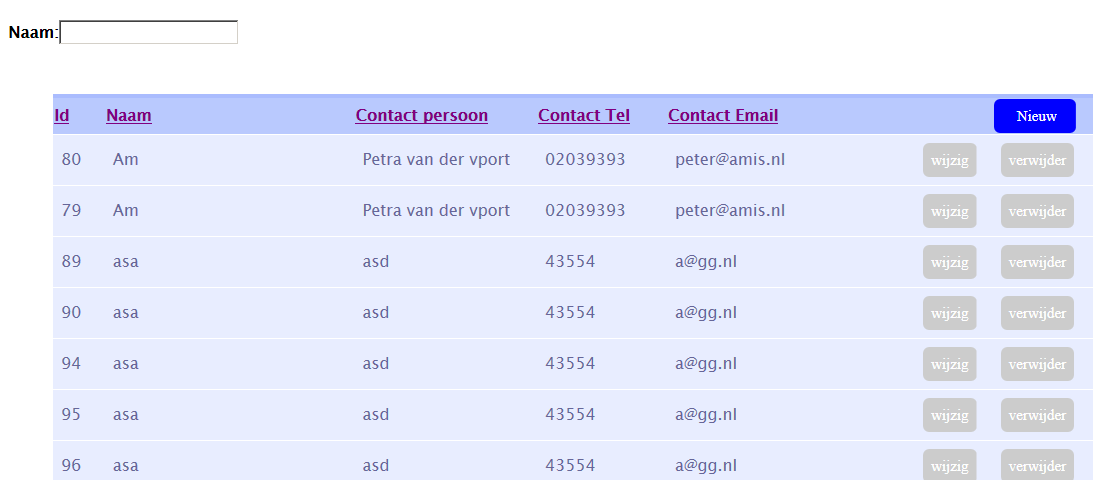 By typing in the text-box the data will immediately be filtered from the back-end, depending on the column clicked. The text label will also change accordingly.
For the Form part the controller part is code like below:
The corresponding HTML is:
I have two controllers defined. One for the Grid and One for the Form.
Here is my Grid controller.
var CompaniesApp = angular.module('Companies', ['CompanyService']);

CompaniesApp.controller("CompaniesGridCtrl", function($http, $scope, $location, CompanySrv){
// Grid Controller uses CompanySrv as the service to get the data from
 $scope.companyData = CompanySrv.data;        // Let scope data point to to service data
 $scope.SearchString="";
 var loadData = function (Orderby) {
  if (Orderby !== $scope.LastOrderby)      // Clear search string if sort order changes
   $scope.SearchString="";
  $scope.LastOrderby=Orderby;        // Remember last order by
  CompanySrv.getCompanies(Orderby, $scope.SearchString);  // Get the companies for the grid
 };
 $scope.Searchlabel='Naam:';         // initial sorting
 loadData('Name');           // initial data load
 //
 $scope.gotoAddCompany = function () {        // Pressed the new button in the grid
  $location.path( '/NewCompany');
 };
 $scope.editCompany = function(pCompany_id) {    // Pressed the edit company in the grid
  $location.path( '/EditCompany/' + pCompany_id);
 };
 $scope.UpdateTable = function () {       // Update called from header click to reorder grid.
  loadData($scope.LastOrderby);
 };
 $scope.deleteCompany= function(p_Company_id) {
  CompanySrv.deleteCompany(p_Company_id,true)
  .then (function(){
   loadData($scope.LastOrderby);}
  );
 }
 $scope.refreshData = function (p_Orderby,p_NewSearchlabel) { // From filtering in textbox update
  $scope.Searchlabel=p_NewSearchlabel;
  loadData(p_Orderby);
 };
});
The controller uses the CompanySrv (service) as I blogged about before. I have some extra code, since I want to be able to click on a header and then resort my data, and have my search box on the screen search by the column clicked.
<div>
 <p id="searchtext" >
  <b>{{Searchlabel}}</b><input type="text" ng-model="SearchString"
   ng-change="UpdateTable()">
 </p>
 <table id="box-table-a" style="width: 70%">
  <thead >
   <tr>
    <th scope="col"><a href="" ng-click="refreshData('Company_id','Nr:')">Id</a></th>
    <th scope="col"><a href="" ng-click="refreshData('name','Naam:')">Naam</a></th>
    <th scope="col"><a href="" ng-click="refreshData('Contact_Name','Contact naam:')">Contact
      persoon</a></th>
    <th scope="col"><a href="" ng-click="refreshData('Contact_Tel','Contact Tel-Nr:')">Contact
      Tel</a></th>
    <th scope="col"><a href="" ng-click="refreshData('Contact_Email','Contact E-mail:')">Contact
      Email</a></th>
    <th scope="col"></th>
    <th scope="col"><button id="newbutton"
      ng-click="gotoAddCompany()">&Nieuw&</button></th>
   </tr>
  </thead>
  <tbody>
   <tr ng-repeat="Company in companyData.companies">
    <td>{{Company.Company_Id}}</td>
    <td>{{Company.Name}}</td>
    <td>{{Company.Contact_Name}}</td>
    <td>{{Company.Contact_Tel}}</td>
    <td>{{Company.Contact_Email}}</td>    <td>
      <button id="editbutton" ng-click="editCompany(Company.Company_Id)">wijzig</button>
    </td>
    <td>
     <button id="deletebutton" ng-click="deleteCompany(Company.Company_Id)">verwijder</button>
    </td>
   </tr>
  </tbody>
 </table>
</div>
The resulting output looks as following:
For the Form part the controller part is code like below:
CompaniesApp.controller("CompaniesFormCtrl",function($http,$scope,$log,$location,$routeParams,CompanySrv){

 $scope.companyData = CompanySrv.data; // Set the scope data to the service data

 $scope.goHome = function () {     // used in comany form to cancel so must be scope function
  $location.path( '/Companies');
 };
 var param = $routeParams.Companyid;  // see if a company id is passed on url, then get it from the server
 if (param!=null) {      // Parameter passed on form, must be update instead of delete.
  CompanySrv.getCompany(param)
  .then(function(data) {
  },function(error) {
   alert("Error in CompanyCrud-10: "+  error.data);
  }
  );
  $scope.Mode="Update";
 }
 else         // no parmeter thus insert
 {
  $scope.companyData=null;
  $scope.Mode="Insert";
 }

 $scope.submit = function(form) {     // insert/ update form.
  // Trigger validation flag.
  $scope.submitted = true;
  if (form.$invalid) {     // If form is invalid, return and let AngularJS show validation errors.
   return;
  }
  if ($scope.Mode=="Update")   // Call update service as promise.
   CompanySrv.saveCompany($scope.companyData.currentCompany)
   .then(function(data) {
    $scope.goHome();
   }, function(error) {
    scope$message=error;
   });
  else
   CompanySrv.insertCompany($scope.companyData.currentCompany)
   .then(function(data) {
    $scope.goHome();
   }, function(error) {
    scope$message=error;
   });
 };
});
The corresponding HTML is:
<form name="CompanyForm">
 <h1>Bedrijf</h1>
 <table id="box-table-a" style="width:50%">
  <tr>
   <td>Bedrijfs-nr:</td>
   <td><b>{{companyData.currentCompany.Company_Id}}</b></td>
  </tr>

  <tr>
   <td>Bedrijfs-naam:</td>
   <td><input ng-model="companyData.currentCompany.Name" type="text" maxlength="50" required="required"/></td>
  </tr>
  <tr>
   <td>Contact persoon:</td>
   <td><input ng-model="companyData.currentCompany.Contact_Name" type="text" maxlength="50" /></td>
  </tr>
  <tr>
   <td>Contact Email:</td>
   <td><input type="email" ng-model="companyData.currentCompany.Contact_Email" maxlength="80"/></td>
  </tr>
  <tr>
   <td>Contact Telefoon-nummer:</td>
   <td><input type="text" ng-model="companyData.currentCompany.Contact_Tel" maxlength="10"/></td>
  </tr>
  <tr>
   <td>
    <button id="Savebutton" ng-click="submit(CompanyForm)">Bewaar</button>
    <button id="Cancelbutton" formnovalidate ng-click="goHome()">Annuleer</button>
   </td>
   <td></td>
  </tr>
 </table>
 {{message}}
</form>
Monday, August 18, 2014
Creating service wrapper for restapi to database in AngularJs
I finally had some time this weekend to refactor my code and start writing services to access my database objects. What I really needed was some way to wrap around the $http service to make things more readable and logical in my code.
Here is my wrapper for access to the company data table.
Basically it contains crud code for insert,delete and updating company data, but it also contains a collection of companies, that can be filled with the getCompanies method. This method take two parameters, a filter and an order by string. Both will by passed by my Rest service, so the correct data is returned. This service is used in my controller. I generally create two controllers. One to manged my company grid, and one to manage my company form. The name of the controller says it all : CompaniesFormCtrl and CompaniesGridCtrl. Let me show you my CompaniesFormCtrl, this is the controller that's matching the From to edit my companies. The corresponding Html is named EditCompany.Html.
Here is my wrapper for access to the company data table.
var Company = angular.module('CompanyService',[]);
Company.factory('CompanySrv',
  ['$http',
   function ($http) {
   var CompanySrv = {
     data: {
      currentCompany: {},
      companies : []
     },
     getCompany: function (p_Id) {
      return $http.get(GloServername + "RestCompanies/getone/"+ p_Id + "/" + GetNewKey())
      .success(function success(data) {
       CompanySrv.data.currentCompany = data;
      })
      .error(function error() {
      });
     },
     getCompanies : function(p_Orderby,p_Zoekstring){
      var httprequest="";
      if (p_Zoekstring=="" || p_Zoekstring==null)
       httprequest = GloServername + "RestCompanies/" + p_Orderby + "/" + GetNewKey();
      else
       httprequest = GloServername + "RestCompanies/" + p_Orderby + "/" + p_Zoekstring + "/" + GetNewKey();
      return $http.get(httprequest)
      .success(function success(data) {
       CompanySrv.data.companies = data;
      })
      .error(function error() {
      });
     },
     insertCompany : function(company){
      return $http.post(GloServername + "RestCompanies/Post",company)
      .success(function(data, status, headers) {
      })
      .error(function(data, status, headers, config) {
      });
     },
     saveCompany : function(company){
      return $http.put(GloServername + "RestCompanies/Put",company)
      .success(function success() {
      })
      .error(function error() {
      });
     },
     deleteCompany : function(p_Id,p_Confirmation){
      if (p_Confirmation==true)
      {
       var retVal = confirm('Verwijder bedrijf');
       if (retVal!=true)
        return;
      }
      return $http.delete(GloServername + "RestCompanies/Delete/" + p_Id)
      .success(function success() {
       ;
      })
      .error(function error() {
       ;
      });
     }
   };
   return CompanySrv;
  }
  ]);
Basically it contains crud code for insert,delete and updating company data, but it also contains a collection of companies, that can be filled with the getCompanies method. This method take two parameters, a filter and an order by string. Both will by passed by my Rest service, so the correct data is returned. This service is used in my controller. I generally create two controllers. One to manged my company grid, and one to manage my company form. The name of the controller says it all : CompaniesFormCtrl and CompaniesGridCtrl. Let me show you my CompaniesFormCtrl, this is the controller that's matching the From to edit my companies. The corresponding Html is named EditCompany.Html.
Sunday, August 17, 2014
Making my SPA application in AngularJS
Ok, now that I have some pages and a basic understanding, the possibility of a SPA (Single Page Application) seems the next challenge. A SPA consist of an entry page with somewhere in the middle a ng-view tag, just like this :
In between the two divs you will replace the content with the help of a routing mechanism. To use routing you need to include the angular-route.min.js script in your html page. To load pages into you ng-view use a way with buttons or links that will navigate to another page: My Example:
You will need routing set up in you app module: Here is an example (my app.js):
As you can see the:
matches
/Companies
in the when part of the router. You will have to pass the template that gets loaded.
The template is not a full HTML page but a html partial. You can also pass a controller to be used in the page partial that gets loaded. You do not have a controller in the page itself.
For instance my About.html looks as following:
A small snip-it indeed !
Do not forget to add the scripts you need in the index.html.
Here is my complete index.html:
<div ng-view>

</div>
In between the two divs you will replace the content with the help of a routing mechanism. To use routing you need to include the angular-route.min.js script in your html page. To load pages into you ng-view use a way with buttons or links that will navigate to another page: My Example:
<div class="container">
<div class="row">
<table>
<tr>
<td><a id="Menubutton" href="#/Contracts"> Contracts </a></td>
<td><a id="Menubutton" href="#/Companies"> Companies </a></td>
<td><a id="Menubutton" href="#/About"> About </a></td>
</tr>
</table>
<div ng-view></div>
You will need routing set up in you app module: Here is an example (my app.js):
var ContractsApplication = angular.module('ContractsApp', ['ngRoute','ngResource','Contracts','Companies']);

ContractsApplication.config(['$routeProvider',
                  function($routeProvider,$routeParams) {
 $routeProvider.
 when('/AddNewOrder', {
  templateUrl: 'add-order.html'

 }).
 when('/Home', {
  templateUrl: 'index.html'

 }).

 when('/About', {
  templateUrl: 'About.html'
 }).
 when('/NewContract', {
  controller: 'ContractsFrm',
  templateUrl: 'NewContract.html'
 }).

 when('/NewCompany', {
  controller: 'CompaniesFormCtrl',
  templateUrl: 'NewCompany.html'
 }).
 when('/EditCompany/:Companyid', {
  controller: 'CompaniesFormCtrl',
  templateUrl: 'EditCompany.html'
 }).

 when('/Companies', {
  controller: 'CompaniesCtrl',
  templateUrl: 'Companies.html'
 }).

 when('/Contracts', {
  controller: 'ContractsCtrl',
  templateUrl: 'Contracts.html'

 });
}]);
As you can see the:
#/Companiesmatches
/Companies
in the when part of the router. You will have to pass the template that gets loaded.
The template is not a full HTML page but a html partial. You can also pass a controller to be used in the page partial that gets loaded. You do not have a controller in the page itself.
For instance my About.html looks as following:
<h2>About</h2>
Contract application Version 1.01 Date : 14-aug-2014
A small snip-it indeed !
Do not forget to add the scripts you need in the index.html.
Here is my complete index.html:
<!DOCTYPE html>
<html lang="en">
<META HTTP-EQUIV="CACHE-CONTROL" CONTENT="NO-CACHE">
<head>
<title>Contracts</title>
</head>

<body ng-app="ContractsApp">

 <div class="container">
  <div class="row">
   <table>
    <tr>
     <td><a id="Menubutton" href="#/Contracts"> Contracts </a></td>
     <td><a id="Menubutton" href="#/Companies"> Companies </a></td>
        <td><a id="Menubutton" href="#/About"> About </a></td>
    </tr>
   </table>
   <div ng-view></div>

  </div>
 </div>
 <script src="Scripts/angular.min.js"></script>
 <script src="Scripts/angular-route.min.js"></script>
 <script src="Scripts/angular-resource.min.js"></script>
 <script src="Scripts/app.js"></script>
 <script src="Scripts/ContractCRUD.js"></script>
 <script src="Scripts/Contract_Utils.js"></script>
 <script src="Scripts/Form.js"></script>
 <script src="Scripts/CompanyCRUD.js"></script>
 <script src="Scripts/CompanySrv.js"></script>
 <script src="//code.jquery.com/jquery-1.10.2.js"></script>
 <script src="//code.jquery.com/ui/1.11.0/jquery-ui.js"></script>

</body>
</html>
Modularizing my AngularJS application
Slowly I'm refactoring My Angular application.
I really like to put general functionality in separate files and services. Not an easy task in Angular, since you really have to get the concept right with modules and dependency injection.
My main application in app.js is dependent on Contracts and Companies.
The Contracts module depends on services that I want to use in all my forms, called frmServices.
In Frmservices I want to use the HTTP Service, for instance to have a more generic delete call that I want to use from wherever I like.
With trail and error the structure now looks like this:
Main app.js (partial)
var ContractsApplication = angular.module('ContractsApp', ['ngRoute','ngResource','Contracts','Companies']);
Company.js (partial)
var CompaniesApp = angular.module('Companies', ['frmServices']);
Form.js (dependent on $http)
When you want to use the delete function in the service, do not forget to inject the service in your controller. In this case in the Company.js (the frm injection):
CompaniesApp.controller("CompaniesCtrl",function($http,$scope,$location,frm){
You can then call the delete from within the controller as following:
if (frm.Delete("Delete ?","RestCompanies",pCompany_id)==true)
Hope this helps. It took me several hours to figure it all out. The nice thing is however you can have a whole hierarchy of dependent modules. Be carfull with your service names however. They have to be unique. There is a lot more refactoring to do, since ultimately I would like to pass a company service to the delete function, that will take care of the delete.
I really like to put general functionality in separate files and services. Not an easy task in Angular, since you really have to get the concept right with modules and dependency injection.
My main application in app.js is dependent on Contracts and Companies.
The Contracts module depends on services that I want to use in all my forms, called frmServices.
In Frmservices I want to use the HTTP Service, for instance to have a more generic delete call that I want to use from wherever I like.
With trail and error the structure now looks like this:
Main app.js (partial)
var ContractsApplication = angular.module('ContractsApp', ['ngRoute','ngResource','Contracts','Companies']);
Company.js (partial)
var CompaniesApp = angular.module('Companies', ['frmServices']);
Form.js (dependent on $http)
var FormApp = angular.module('frmServices', [])
.factory("frm", ['$http', function($http) {
    return {
        Delete: function(p_Deltext,p_Url,p_Id) {
            var retVal = confirm(p_Deltext);
            if (retVal==true) {
                var httprequest=GloServername + p_Url + "/Delete/" + p_Id;
                $http.delete(httprequest).success(function() {
                    return true;
                }).error(function(data,status){alert("failure Delete: HTTP code:" + status)});
            }
            return false;
        },

        Update: function() {
            //Do something else here
        }
    }}]);
When you want to use the delete function in the service, do not forget to inject the service in your controller. In this case in the Company.js (the frm injection):
CompaniesApp.controller("CompaniesCtrl",function($http,$scope,$location,frm){
You can then call the delete from within the controller as following:
if (frm.Delete("Delete ?","RestCompanies",pCompany_id)==true)
Hope this helps. It took me several hours to figure it all out. The nice thing is however you can have a whole hierarchy of dependent modules. Be carfull with your service names however. They have to be unique. There is a lot more refactoring to do, since ultimately I would like to pass a company service to the delete function, that will take care of the delete.
Saturday, August 16, 2014
Refreshing server data in $http request in AngularJS
I'm getting along with my sample Angular project. One of the hurdles I had to take was refreshing my data after going from a list to a data form to change company data. Returning to the list would show the old data. Http requests get cached by the browser when the request string is the same as in a previous request.
Finally I found that generating unique keys with each http request was a simple solution to guarantee that the http request was actually going to the rest server instead of returning the cached data.
I did it as following (javascript code):
Off course I also had to change my Java server side code to include the unique key. The signature of the class now looks as following:
When you want to cache your data, simply leave out the key.
Finally I found that generating unique keys with each http request was a simple solution to guarantee that the http request was actually going to the rest server instead of returning the cached data.
I did it as following (javascript code):
var d = new Date();
var n = d.getTime(); // generate unique key
var httprequest="";
httprequest = "http://localhost:9080/ContractsRestServer/rest/RestCompanies/" + Orderby + "/" + n;
$http.get(httprequest)
        .success(function(data) {
            $scope.Companies=data
        }).error(function(data,status){alert("failure CompaniesController: HTTP code:" + status)});
Off course I also had to change my Java server side code to include the unique key. The signature of the class now looks as following:
package com.testres;

import java.util.List;

import javax.ws.rs.DELETE;
import javax.ws.rs.GET;
// import javax.ws.rs.PUT;
import javax.ws.rs.Path;
import javax.ws.rs.PathParam;
import javax.ws.rs.Produces;
import javax.ws.rs.core.MediaType;
import javax.ws.rs.core.Response;

import com.google.gson.Gson;
import com.google.gson.GsonBuilder;

import ContractsDB.Models.*;

// http://localhost:9080/ContractsRestServer/rest/RestCompanies
// http://localhost:9080/ContractsRestServer/rest/RestCompanies/name    to order by name

@Path("RestCompanies")
public class GetCompanies {

 // This method is called if TEXT_PLAIN is request

 @GET
 @Produces("application/json") // MediaType.APPLICATION_JSON)
 @Path("/{orderby}/{key}")
 public String Get(@PathParam("orderby") String p_OrderBy,@PathParam("key") String p_Key) {
  System.out.println("in getcompanies + " + p_OrderBy  );
        Company_Factory cf = new Company_Factory();
        List<Company> Company_List = cf.QueryCompany("", p_OrderBy);
        Gson gson = new GsonBuilder().create();
  return gson.toJson(Company_List);
 }
When you want to cache your data, simply leave out the key.
Wednesday, August 13, 2014
My Eclips AngularJS dev environment
I'm working on my Contracts application with AngularsJS. I'm using Eclips Luna for this development. Maybe not ideal, but since I have to create 3 tiers being Db layer, Rest service layer and UI layer (HTML) I feel it is the best and it is completely free (so is the rest of everything I use to develop the SPA (Single page application).
Here is a screen shot of the 3 projects:

It speaks rather for itself. The Contracts DB project creates a JAR file that is used by the Contracts Rest server application. This way I can separate the work. The ContractsDB contains units test to test all of my Db capabilities, so I can rest assured it will keep working after DB or code changes in my DB layer.
For The rest server and the Contracts web I made two seperate Tomcat Server instances (version 8.01), Like So:

Here is a screen shot of the 3 projects:
It speaks rather for itself. The Contracts DB project creates a JAR file that is used by the Contracts Rest server application. This way I can separate the work. The ContractsDB contains units test to test all of my Db capabilities, so I can rest assured it will keep working after DB or code changes in my DB layer.
For The rest server and the Contracts web I made two seperate Tomcat Server instances (version 8.01), Like So:
I did this so I can test on one PC the fact that in production the HTML web server will probably be on an other server then the Services implementation. Do not forget the change the port of one of the servers, otherwise the second will not start. You can change the properties f the server by double clicking on it.
Sunday, August 10, 2014
My Java rest service for my Angular Web application
To get all the companies to my web application I had to write a REST service in Java. I'm using the Eclipse Luna version together with the javax.ws libraries from the jersey implementation (see
Before that i have written my own data classes and put them into a separate project called ContractsDB. From the Project I export the JAR file and will use it in my Rest project.
I'm not using JPA (Java persistence api), since I think in combination with the web services it is to complicated to get going and to distribute.
My rest service looks as following:
As you can see I return from my own query object, also I am using the Google JSon library to return json syntax.
I test the service with a firefox plugin:

It seems to be working, next step will be to create a page and retrieve the data with AngularJS.
http://jersey.java.net/ )This is the simplest implementation.
Before that i have written my own data classes and put them into a separate project called ContractsDB. From the Project I export the JAR file and will use it in my Rest project.
I'm not using JPA (Java persistence api), since I think in combination with the web services it is to complicated to get going and to distribute.
My rest service looks as following:
 package com.testres;

import java.util.List;

import javax.ws.rs.GET;
// import javax.ws.rs.PUT;
import javax.ws.rs.Path;
import javax.ws.rs.PathParam;
import javax.ws.rs.Produces;
import com.google.gson.Gson;
import com.google.gson.GsonBuilder;

import ContractsDB.Models.*;

// http://localhost:9080/TestRest/rest/RestCompanies
// http://localhost:9080/TestRest/rest/RestCompanies/name    to order by name

@Path("RestCompanies/{orderby}")
public class GetCompanies {

     // This method is called if TEXT_PLAIN is request

    @GET
    @Produces("application/json") // MediaType.APPLICATION_JSON)

    public String Get(@PathParam("orderby") String p_OrderBy) {
        Company_Factory cf = new Company_Factory();
        List<Company> Company_List = cf.QueryCompany("", p_OrderBy);
        Gson gson = new GsonBuilder().create();
        return gson.toJson(Company_List);
    }
}
As you can see I return from my own query object, also I am using the Google JSon library to return json syntax.
I test the service with a firefox plugin:
It seems to be working, next step will be to create a page and retrieve the data with AngularJS.
Saturday, August 9, 2014
Starting my Angular Project
Last several weeks I have been starting my AngularJS adventures.
With the download of the latest version and Eclipse to develop Restfull Services I thought I would build a simple contracts administration.
I have put my database in MySql just for convenience.
I must say the easiest way to start is just to copy the Angular scripts to a subfolder Scripts in my HTML root directory, and then add the scripts reference to my index.html page.
I use the angular-route.min.js since I want to make a Singe web page application using the ng-view directive. Something that will add to the complexity immediately.
The script tags I put just beforethe end body tag, since i want to load the HTML first. Just to see if the Angular framework works I have put the following code:
Notice the ng-app and the ng-model="data.message". Both directives will be used to indicate to the Angular java-script that the source should be treated by the angular framework.
If your browser shows : data.message in the screen something is not right. It should present you with an input box and retype everything you type into the box like so:

if it shows this:

.....somethings wrong. Either you did not add the ng-app tag, or it did not reference the javascripts files in the right way.
If it show the right screen that's it. you're off to a start in the wonderful Angular.Js world.
I use the angular-route.min.js since I want to make a Singe web page application using the ng-view directive. Something that will add to the complexity immediately.
The script tags I put just beforethe end body tag, since i want to load the HTML first. Just to see if the Angular framework works I have put the following code:
<html ng-app>
  <head>
   </head>
  <body>
    <div>
    <input type="text" ng-model="data.message" />
    <h1>{{ data.message }}</h1>
    </div>
    <script src="Scripts/angular.min.js"></script>
  </body>
</html>
Notice the ng-app and the ng-model="data.message". Both directives will be used to indicate to the Angular java-script that the source should be treated by the angular framework.
If your browser shows : data.message in the screen something is not right. It should present you with an input box and retype everything you type into the box like so:
if it shows this:
.....somethings wrong. Either you did not add the ng-app tag, or it did not reference the javascripts files in the right way.
If it show the right screen that's it. you're off to a start in the wonderful Angular.Js world.
Sunday, December 13, 2009
Inversion of Control
With the latest Genwise Software factory project we are using a pattern that is called Inversion of Control, or also known as Dependency Injection (what's in a name). Getting our heads around this pattern took a while and it was hard to find a simple sample that just demonstrates the simplest implementation of this technique. (more complex implementations using service locators can be found elsewhere). In this simplest sample a movie database printer prints movies from different movie sources. One is supposed to be memory and the other a text file.
You can download the sample here
You can download the sample here
Friday, November 20, 2009
GSF beta 1 approaching
After our DSL research and string templating adventures we are now at the point to almost release a public beta for the GSF. (GenWise Software Factory) We have decided to create DSL's for the Data modeling and Business Object modeling. We have created templates for the Domain (Traditional Business Objects) , the DAO (Data access object layer) and some example code how to use it all in a WPF application. Below is an example Database scheam imported with one of our import utilities.

Basically what you get when you use GSF are the following modules:
- VS 2005 integration
- Database modeling with import schema from SQl-server or Oracle
- Business object class diagram created from the Datamodel but extendable with OO features
- DOA and Domain generation with partial classes and partial methods
- MVVM framework (Model view - View model pattern)
- Made for WPF binding but not limited to WPF.

Basically what you get when you use GSF are the following modules:
- VS 2005 integration
- Database modeling with import schema from SQl-server or Oracle
- Business object class diagram created from the Datamodel but extendable with OO features
- DOA and Domain generation with partial classes and partial methods
- MVVM framework (Model view - View model pattern)
- Made for WPF binding but not limited to WPF.
Saturday, November 29, 2008
Microsoft DSL Tools
At GenWise we are currently investigating using the Microsoft DSL tools for code generation. I must say I am really impressed by what Microsoft has done with this tool. Not only make it possible to model your ideas, but also to instantiate that model and make incarnations for the real world. It is highly customizable and expandable. Together with string templating you can make very useful code generation environments. It takes a specific way to look at your implementation though if you want to preserve your own additions to he generated code. You will have to implement lots of base classes and code for partial class use from the beginning.
In general the extensibility is not so well documented, and there seems to be only a few specialists around. I do not know if we will come to a marketable product at this point in time, but I'm sure if you keep an eye on Genwise.com that sooner or later you will be able to find more about our DSL adventures.
In general the extensibility is not so well documented, and there seems to be only a few specialists around. I do not know if we will come to a marketable product at this point in time, but I'm sure if you keep an eye on Genwise.com that sooner or later you will be able to find more about our DSL adventures.
Tuesday, February 19, 2008
Dicom the easy way
I have been searcing for a while for an open source DICOM library. The thing I hate the most about open source is that many things are started by one man shops, and after a while development stops. A good example of a nice Dicom library is OpenDicom. See www.opendicom.org. Problem is that development is stopped and the documentation is not that great.
I wanted to report on a great Dicom library I came across today. It is called ClearCanvas See www.clearcanvas.ca
It is unbelievable how accessible thay made dicom file access and dicom file viewing.
I wanted to modify some dicom file programmatically in VS 2005. You can do this very easily with the Clearcanvas SDK. The SDK is vary well documented and it took me about 30 minutes to get code going to change a patient Id in a dicom image, somthing I was not able to do very easily with other open source dicom libraries.
The library is also documented very well, with sample code, and the site has a good forum.
Here is the code:
I wanted to report on a great Dicom library I came across today. It is called ClearCanvas See www.clearcanvas.ca
It is unbelievable how accessible thay made dicom file access and dicom file viewing.
I wanted to modify some dicom file programmatically in VS 2005. You can do this very easily with the Clearcanvas SDK. The SDK is vary well documented and it took me about 30 minutes to get code going to change a patient Id in a dicom image, somthing I was not able to do very easily with other open source dicom libraries.
The library is also documented very well, with sample code, and the site has a good forum.
Here is the code:
using System;
using System.Collections.Generic;
using System.ComponentModel;
using System.Data;
using System.Drawing;
using System.Text;
using System.Windows.Forms;
using ClearCanvas.Dicom;
namespace CCDicom
{
public partial class DicomAttibuteViewer : Form
{
public DicomAttibuteViewer()
{
InitializeComponent();
}
private void btGo_Click(object sender, EventArgs e)
{
DicomFile _df = new DicomFile(@"C:\user\DotNet\OpenDicom\DicomSampleFiles\00000014.dcm");
_df.Load(DicomReadOptions.Default);
DicomAttributeCollection _ds = _df.DataSet;
foreach (DicomAttribute _da in _ds)
{
if (_da.Tag.Group == 16 && _da.Tag.Element == 32)
{
// Patient ID
_da.SetString(0, "mypatientid");
}
if (_da.Tag.Group == 10)
{
}
this.listBox1.Items.Add(_da.Tag +"->" + _da.ToString());
}
_df.Save(@"c:\user\DotNet\OpenDicom\DicomSampleFiles\erik1.dcm");
}
}
}
Subscribe to:
Posts (Atom)