Today, I have finalized what I consider my version 1 for a CRUD made with angular based on Rest services.
I have two controllers defined. One for the Grid and One for the Form.
Here is my Grid controller.
var CompaniesApp = angular.module('Companies', ['CompanyService']);

CompaniesApp.controller("CompaniesGridCtrl", function($http, $scope, $location, CompanySrv){
// Grid Controller uses CompanySrv as the service to get the data from
 $scope.companyData = CompanySrv.data;        // Let scope data point to to service data
 $scope.SearchString="";
 var loadData = function (Orderby) {
  if (Orderby !== $scope.LastOrderby)      // Clear search string if sort order changes
   $scope.SearchString="";
  $scope.LastOrderby=Orderby;        // Remember last order by
  CompanySrv.getCompanies(Orderby, $scope.SearchString);  // Get the companies for the grid
 };
 $scope.Searchlabel='Naam:';         // initial sorting
 loadData('Name');           // initial data load
 //
 $scope.gotoAddCompany = function () {        // Pressed the new button in the grid
  $location.path( '/NewCompany');
 };
 $scope.editCompany = function(pCompany_id) {    // Pressed the edit company in the grid
  $location.path( '/EditCompany/' + pCompany_id);
 };
 $scope.UpdateTable = function () {       // Update called from header click to reorder grid.
  loadData($scope.LastOrderby);
 };
 $scope.deleteCompany= function(p_Company_id) {
  CompanySrv.deleteCompany(p_Company_id,true)
  .then (function(){
   loadData($scope.LastOrderby);}
  );
 }
 $scope.refreshData = function (p_Orderby,p_NewSearchlabel) { // From filtering in textbox update
  $scope.Searchlabel=p_NewSearchlabel;
  loadData(p_Orderby);
 };
});
The controller uses the CompanySrv (service) as I blogged about before. I have some extra code, since I want to be able to click on a header and then resort my data, and have my search box on the screen search by the column clicked.
<div>
 <p id="searchtext" >
  <b>{{Searchlabel}}</b><input type="text" ng-model="SearchString"
   ng-change="UpdateTable()">
 </p>
 <table id="box-table-a" style="width: 70%">
  <thead >
   <tr>
    <th scope="col"><a href="" ng-click="refreshData('Company_id','Nr:')">Id</a></th>
    <th scope="col"><a href="" ng-click="refreshData('name','Naam:')">Naam</a></th>
    <th scope="col"><a href="" ng-click="refreshData('Contact_Name','Contact naam:')">Contact
      persoon</a></th>
    <th scope="col"><a href="" ng-click="refreshData('Contact_Tel','Contact Tel-Nr:')">Contact
      Tel</a></th>
    <th scope="col"><a href="" ng-click="refreshData('Contact_Email','Contact E-mail:')">Contact
      Email</a></th>
    <th scope="col"></th>
    <th scope="col"><button id="newbutton"
      ng-click="gotoAddCompany()">&Nieuw&</button></th>
   </tr>
  </thead>
  <tbody>
   <tr ng-repeat="Company in companyData.companies">
    <td>{{Company.Company_Id}}</td>
    <td>{{Company.Name}}</td>
    <td>{{Company.Contact_Name}}</td>
    <td>{{Company.Contact_Tel}}</td>
    <td>{{Company.Contact_Email}}</td>    <td>
      <button id="editbutton" ng-click="editCompany(Company.Company_Id)">wijzig</button>
    </td>
    <td>
     <button id="deletebutton" ng-click="deleteCompany(Company.Company_Id)">verwijder</button>
    </td>
   </tr>
  </tbody>
 </table>
</div>
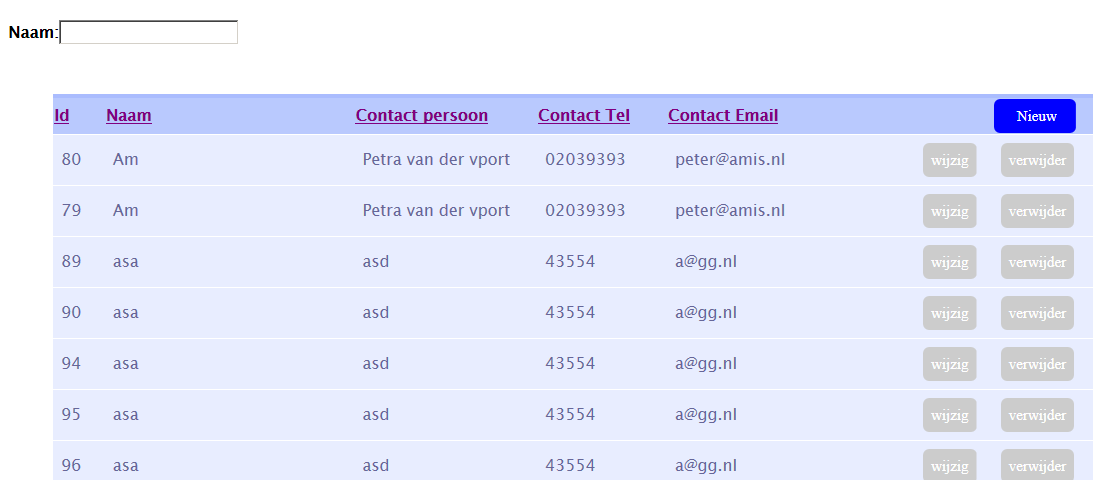
The resulting output looks as following:
By typing in the text-box the data will immediately be filtered from the back-end, depending on the column clicked. The text label will also change accordingly.
For the Form part the controller part is code like below:
CompaniesApp.controller("CompaniesFormCtrl",function($http,$scope,$log,$location,$routeParams,CompanySrv){

 $scope.companyData = CompanySrv.data; // Set the scope data to the service data

 $scope.goHome = function () {     // used in comany form to cancel so must be scope function
  $location.path( '/Companies');
 };
 var param = $routeParams.Companyid;  // see if a company id is passed on url, then get it from the server
 if (param!=null) {      // Parameter passed on form, must be update instead of delete.
  CompanySrv.getCompany(param)
  .then(function(data) {
  },function(error) {
   alert("Error in CompanyCrud-10: "+  error.data);
  }
  );
  $scope.Mode="Update";
 }
 else         // no parmeter thus insert
 {
  $scope.companyData=null;
  $scope.Mode="Insert";
 }

 $scope.submit = function(form) {     // insert/ update form.
  // Trigger validation flag.
  $scope.submitted = true;
  if (form.$invalid) {     // If form is invalid, return and let AngularJS show validation errors.
   return;
  }
  if ($scope.Mode=="Update")   // Call update service as promise.
   CompanySrv.saveCompany($scope.companyData.currentCompany)
   .then(function(data) {
    $scope.goHome();
   }, function(error) {
    scope$message=error;
   });
  else
   CompanySrv.insertCompany($scope.companyData.currentCompany)
   .then(function(data) {
    $scope.goHome();
   }, function(error) {
    scope$message=error;
   });
 };
});
The corresponding HTML is:
<form name="CompanyForm">
 <h1>Bedrijf</h1>
 <table id="box-table-a" style="width:50%">
  <tr>
   <td>Bedrijfs-nr:</td>
   <td><b>{{companyData.currentCompany.Company_Id}}</b></td>
  </tr>

  <tr>
   <td>Bedrijfs-naam:</td>
   <td><input ng-model="companyData.currentCompany.Name" type="text" maxlength="50" required="required"/></td>
  </tr>
  <tr>
   <td>Contact persoon:</td>
   <td><input ng-model="companyData.currentCompany.Contact_Name" type="text" maxlength="50" /></td>
  </tr>
  <tr>
   <td>Contact Email:</td>
   <td><input type="email" ng-model="companyData.currentCompany.Contact_Email" maxlength="80"/></td>
  </tr>
  <tr>
   <td>Contact Telefoon-nummer:</td>
   <td><input type="text" ng-model="companyData.currentCompany.Contact_Tel" maxlength="10"/></td>
  </tr>
  <tr>
   <td>
    <button id="Savebutton" ng-click="submit(CompanyForm)">Bewaar</button>
    <button id="Cancelbutton" formnovalidate ng-click="goHome()">Annuleer</button>
   </td>
   <td></td>
  </tr>
 </table>
 {{message}}
</form>